Le système CRM que les agences facturent 10 k€ par mois.
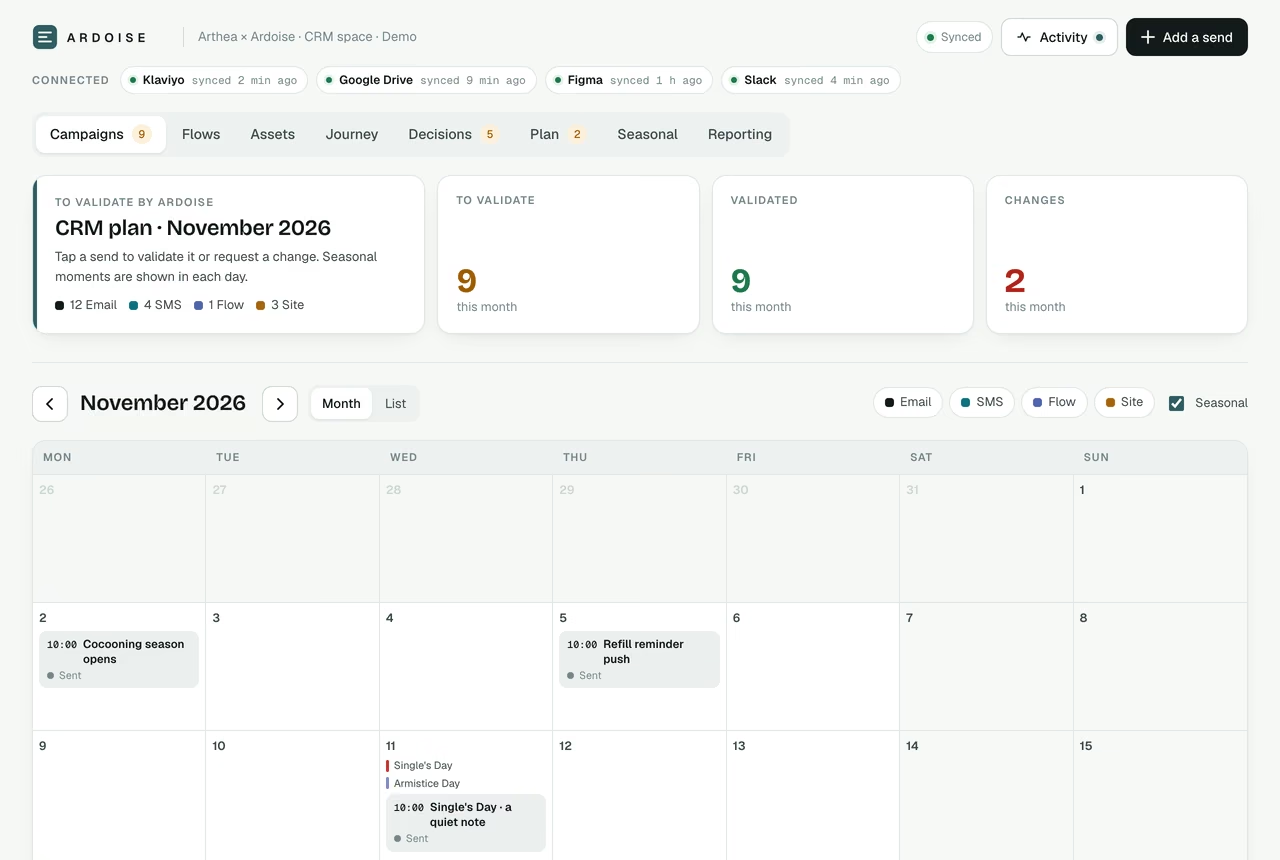
Stratégie et audit, flows de cycle de vie, calendrier de campagnes, design email depuis le Figma de la marque, reporting hebdomadaire et gestion de projet, pilotés comme un seul système par client. Le client valide chaque envoi dans un espace en ligne, connecté à Klaviyo, Drive et Figma. C’est le système que nous faisons tourner pour nos clients, documenté en entier : la mise en place, quatre prompts et le template fini.
Un retainer à 10 k€ par mois, piloté comme un seul système.
Six chantiers qu’une agence traditionnelle confie à six personnes. Ici, ils partagent un seul plan, une seule source de vérité et un seul niveau d’exigence.
D’habitude un stratège CRMStratégie et auditAudit Klaviyo, benchmark du marché, refonte du parcours client et plan de la période.
D’habitude un CRM managerFlows de cycle de vieBienvenue, abandon, post-achat, réassort et reconquête, reconstruits là où ils fuient.
D’habitude un copywriterCampagnesUn mois complet d’envois avec copy, ciblage et angle, validé par le client avant toute sortie.
D’habitude un designerDesign emailDes modules importés du design system Figma de la marque, pour que chaque envoi reste dans la charte.
D’habitude un analysteReportingUn rapport de performance hebdomadaire depuis Klaviyo, classé dans Drive chaque lundi, et une revue mensuelle le 2.
D’habitude un chef de projetGestion de projetTâches, responsables et échéances, et chaque décision livrée avec notre recommandation, dans un seul espace en ligne.
Au programme
Six parties, dans l'ordre où vous les utilisez.
Installé une fois, construit pour chaque client, opéré chaque semaine. Chaque partie est sur cette page, prête à copier.
Klaviyo, Google Drive, Figma et Slack, branchés sur Claude une fois par espace de travail. Lecture partout, écriture en brouillon uniquement.
02
Construire
Un prompt par client. Claude audite Klaviyo, importe la charte depuis Figma, analyse le marché et refond le parcours, puis construit et alimente la page du client.
03
Piloter
Chaque retour est appliqué sur toute la chaîne : copy réécrite et renvoyée en validation, tâches et décisions mises à jour, chaque changement tracé dans l’historique. Chaque session se termine par un compte rendu en trois lignes.
04
Automatiser
Les tâches programmées font le reste : une lecture chaque matin de ce que le client a changé, les reportings hebdo et mensuel dans Drive, le calendrier du mois suivant, une synchro Figma et une veille marché chaque trimestre.
Démo en ligne
Un espace client, à parcourir en vrai.
Ardoise est une marque fictive de bougies et de diffuseurs, construite avec le kit. Validez un envoi, tranchez une décision, ouvrez un flow. Chaque clic fonctionne et rien n'est enregistré.
La mise en place, quatre prompts et le template Client Space fini. Copiez partie par partie, téléchargez les fichiers, ou prenez tout d'un coup. Les prompts restent en anglais : Claude construit l'espace dans la langue de votre client.
Dans Claude (Cowork ou l'application desktop), connectez-les avant tout le reste.
Klaviyo ou votre ESP
Lecture des flows, campagnes, métriques, segments et templates. Écriture en brouillon uniquement.
Google Drive
Le dossier du client, avec cette arborescence :
00 · Brief
01 · Reporting / YYYY / MM
02 · Copy
03 · Assets
04 · Benchmark
Figma
La charte du client et le fichier des modules e-mail. Un accès en lecture suffit.
Slack facultatif
Le canal partagé avec le client, en lecture seule sauf indication contraire.
La seule règle. Claude lit librement et n'écrit que des brouillons. Rien n'est programmé, envoyé ou publié sans votre feu vert explicite.
A
Partie A · Construire
À coller dans un nouveau chat, une fois par client.
Claude récupère tout ce qu'il peut dans les outils connectés, ne vous demande que ce qui manque, livre l'audit Klaviyo, le benchmark et la refonte du parcours sous forme de note, puis construit, publie et alimente la page du client.
Prompt de construction2 684 mots
You are my senior CRM strategist, lifecycle architect, product designer and front-end engineer in one. Build the client's CRM System: a single live web artifact, shared with my client, that replaces Notion, Asana, spreadsheets and the designer handoff for the whole engagement. It holds the campaigns the client validates, the flow architecture, the brand assets imported from Figma, the customer journey revamp with a market benchmark, the decisions to make, the action plan, the seasonal calendar and the reporting. The client acts in the page (validate a send, request a change, answer a decision, tick a task). I steer everything else from this chat and you keep the page's data up to date.

Quality bar: a premium product built for this brand. Editorial, calm, precise, pixel-perfect on desktop and phone, light and dark. No generic AI dashboard look: no gradient blobs, no emoji icons, no stock-looking cards, no filler copy. Every screen must be something the client is proud to open in front of their team.

## 0 · Intake (before any code)

Collect everything you can yourself first, from the connected tools:
- Klaviyo: live flows with their 90-day revenue, open and click rates; the last 90 days of campaigns; list size and growth; segments; templates in use; sending domain health if visible.
- Figma: the brand kit (logo, colour styles or variables, type styles), the email module components, product shots.
- Drive: the brief, past reports, the current calendar.
- The web: the brand's site, popups, Instagram, product pages, reviews.

Then ask me only what is still missing, in ONE message, multiple choice where possible, and wait:
1. Client: brand, site, what they sell, hero products, logo if Figma does not have it.
2. Engagement: my agency name, client contacts (names and roles), the objective for the period with dates, 3 to 6 workstreams, fee model (only if reporting needs a performance scale).
3. Channels active now (email, SMS, WhatsApp, push, flows, site) and default send times.
4. The 4 to 8 segments I use most.
5. Voice: address, tone, banned words, emoji rule, signature, mandatory legal mentions.
6. Interface language and locale = the client's language.
7. The 5 to 10 competitors or reference brands to benchmark (or let you pick them).
Anything still missing stays empty. Never invent data to fill the page.

## 1 · Research before design (deliver as a short memo in the chat, then into the page)

a) Klaviyo audit: every live flow with trigger, emails, 90-day revenue and the obvious gap; campaigns by revenue per recipient; what to keep, fix, switch off.
b) Market benchmark: 15 to 25 brands in the category and adjacent categories. For each, from public sources only (their site, popups, signup flow, public email archives, reviews): welcome series length, first-order incentive, post-purchase education, replenishment, winback timing, SMS use, send frequency. Summarise as archetypes (for example Heritage house, DTC challenger, Marketplace-first) plus "Client today" and "Client target". Never present a guess as an observation: write "not observed".
c) Market read: what the category does, where the white space is, what we do about it. Three cards, one paragraph each.
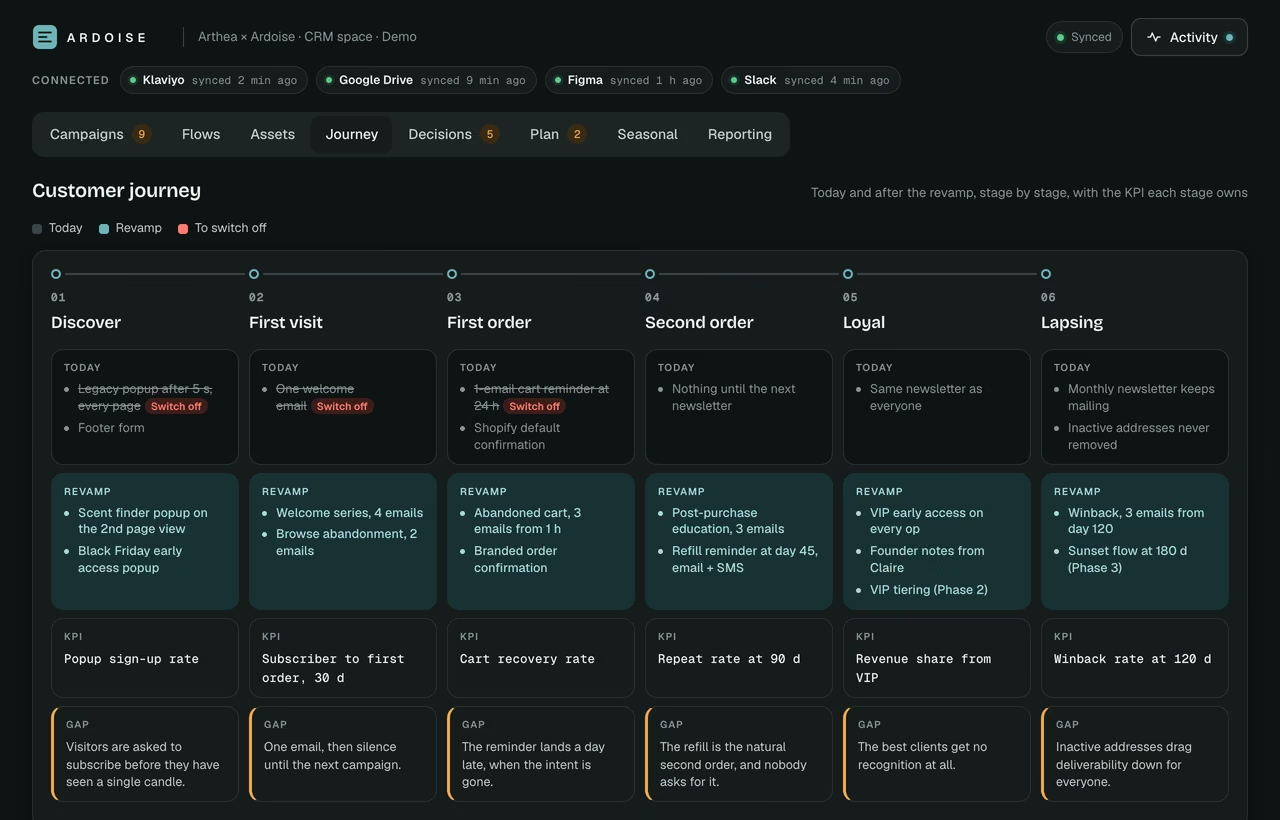
d) Journey revamp: 6 stages (Discover, First visit, First order, Second order, Loyal, Lapsing). For each: today's touchpoints, the revamped touchpoints, the KPI the stage owns, the gap.

## 2 · Shell

- Header: client logo (inline SVG from Figma, or data URI) + muted subtitle "{{Agency}} × {{Client}} · CRM space" (hidden on mobile). Right side: connection pills (Klaviyo · Drive · Figma · Slack with a status dot and "synced N min ago"), a sync pill (Loading / Synced with a green dot and soft halo / Read only / Offline, with a tooltip), an Activity button, and a primary "+" whose label follows the tab ("Add a send", "Add a task", "Add a decision"), hidden on read-only tabs, icon-only on mobile.
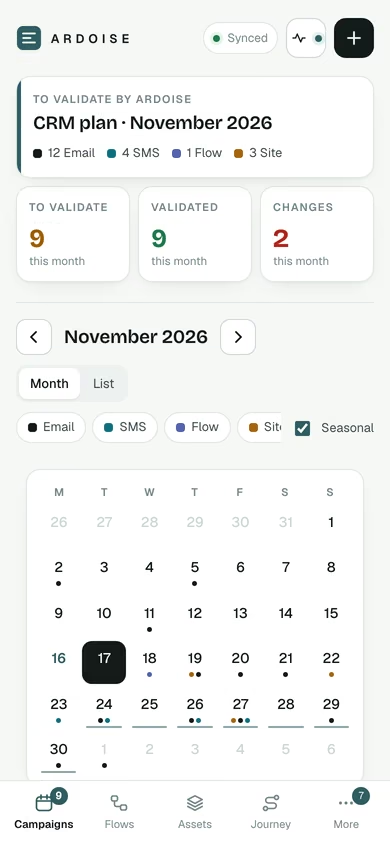
- Navigation: 8 tabs in a sticky segmented control on desktop: Campaigns · Flows · Assets · Journey · Decisions · Plan · Seasonal · Reporting. At ≤760px a fixed bottom bar with the first four and a "More" sheet, safe-area padding. Count badges where attention is needed: sends to validate, overdue tasks, open decisions, assets updated in Figma.
- Tab state in the URL hash (#campaigns, #flows…) and in localStorage (always inside try/catch).
- A toast bottom centre for every action, with Undo where it makes sense.
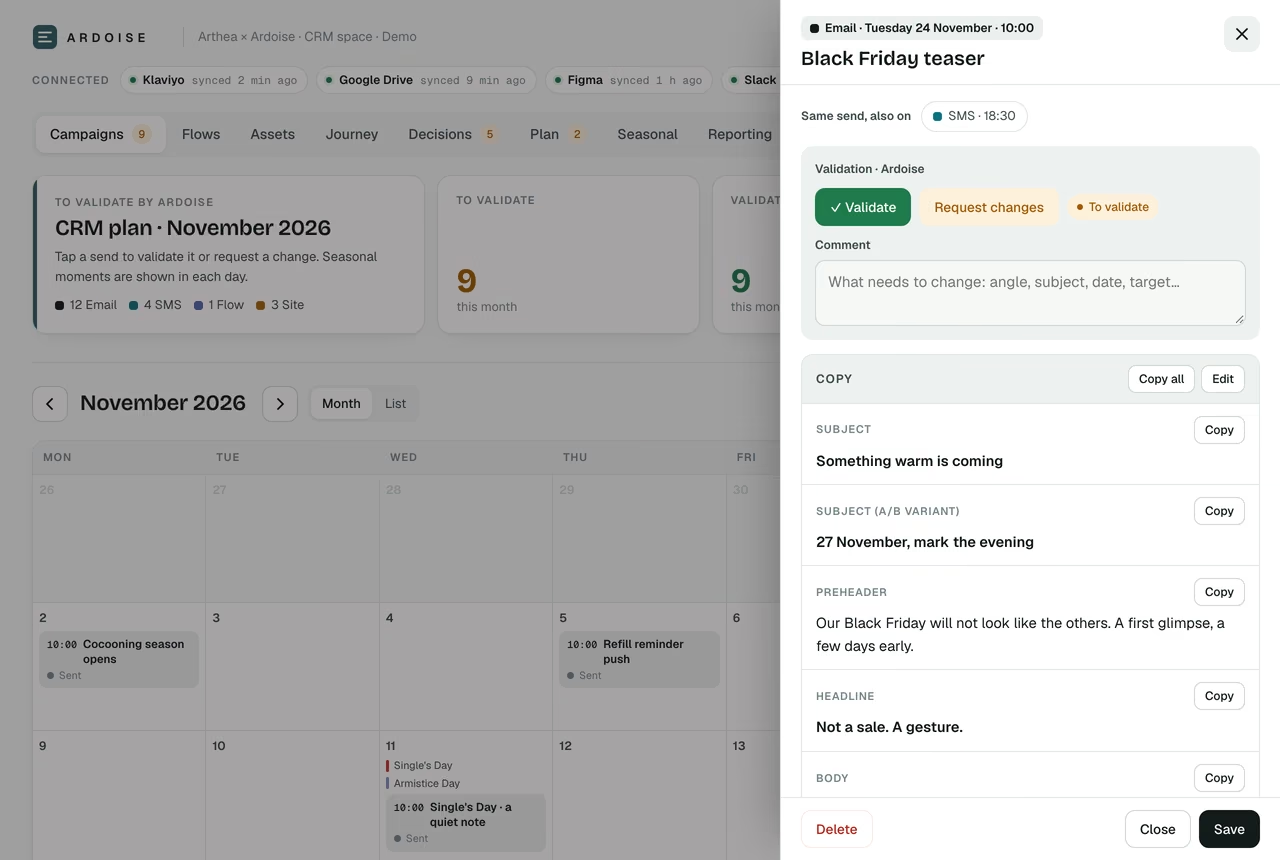
- One right-side drawer (500px, full screen on mobile, scrim, Esc or scrim click closes) for every detail and edit view.
- Activity drawer: every change with who and from where ("Valentin in chat: make the BF teaser warmer · 3 sends rewritten, back to validate", "Claire validated Advent day 1", "Weekly report written to Drive").

## 3 · The eight tabs

### Campaigns (client validation)
- Summary row: intro card (eyebrow "To validate by {{Client}}", H1 "CRM plan · {{Month YYYY}}", one line "Tap a send to validate it or request a change", the month's channel mix with counts) + 3 clickable KPI tiles that filter: To validate (amber), Validated (green), Changes requested (red). A compact Activity card with the last 4 changes.
- Toolbar: month navigation, Month / List toggle, channel filter chips, "Show seasonal moments" toggle.
- Desktop month grid (Mon to Sun): weekend tint, out-of-month days faded, today outlined in the accent, a "+" on day hover. In each day: seasonal moments as thin coloured lines (campaign ops first, bold, accent), then send chips: channel-tinted background, time in mono, title clamped to 2 lines, status dot + label, red border when changes are requested.
- Mobile: mini month (channel dots under each day, accent underline on op days) + the selected day's agenda.
- List view grouped by month: date block, channel badge, title + angle, status pill.
- Send drawer: kicker (channel, date, time), title, target, angle, "Dependencies / to confirm", the Figma modules it uses (thumbnails linking to Assets). Copy panel with Copy all and Edit; each block labelled with its own Copy button (email: Subject, A/B subject, Preheader, Headline, Body, CTA, Signature · WhatsApp: Message, Button · SMS: Message · Flow: Trigger, Exit, Email N delay/subject/body/CTA · Site: Banner, Popup title/text/CTA). "Same send, also on:" chips. Validation box: comment + Validate (green) + Request changes (amber, comment mandatory). Statuses: To validate · Validated · Changes requested · Sent.
- "Add a send" opens the AI composer (§5), with a "Write manually" fallback.

### Flows (architecture)
- Segmented control: Phase 1 · N / Phases 2 to 3 · N / Popups / To switch off · N.
- Phase 1 summary: 3 cards (scope "N flows · N emails", priority and suppression rules, rules common to all flows).
- Flow cards as disclosures: number, name + group, priority badge (P0 in the accent), status pill, go-live date. Open: Trigger · Exit · Filters · Replaces (current flow and its Klaviyo performance), an amber note, then the email table (delay · subject + content · CTA chip · Figma modules used).
- Popups: Live today vs Planned. To switch off: flow and reason.

### Assets (imported from Figma and Drive)
- Brand: logo lockups, colour swatches with token names and hex in mono, type specimens.
- Email modules: one card per Figma component, rendered faithfully in HTML/CSS (header, hero, product grid, review, replenishment block, USP row, footer, countdown), source line "Figma · {{file}} / {{page}}", "Used in N sends".
- Product shots and templates (Campaign, Flow, Plain-text founder note).
- Each asset: status (Synced / Updated in Figma, re-import) and a "Re-import from Figma" action. The chat re-imports, the page shows the result.

### Journey (revamp + benchmark)
- The 6-stage journey map from §1d (scrolls inside its own container on mobile): Today touchpoints (muted, struck through when to switch off), Revamp touchpoints (accent), the stage KPI, the gap note.
- The benchmark table from §1b with archetypes, "Client today" and "Client target", eyebrow "Observed {{Month YYYY}} · N brands reviewed".
- The three market-read cards from §1c.

### Decisions
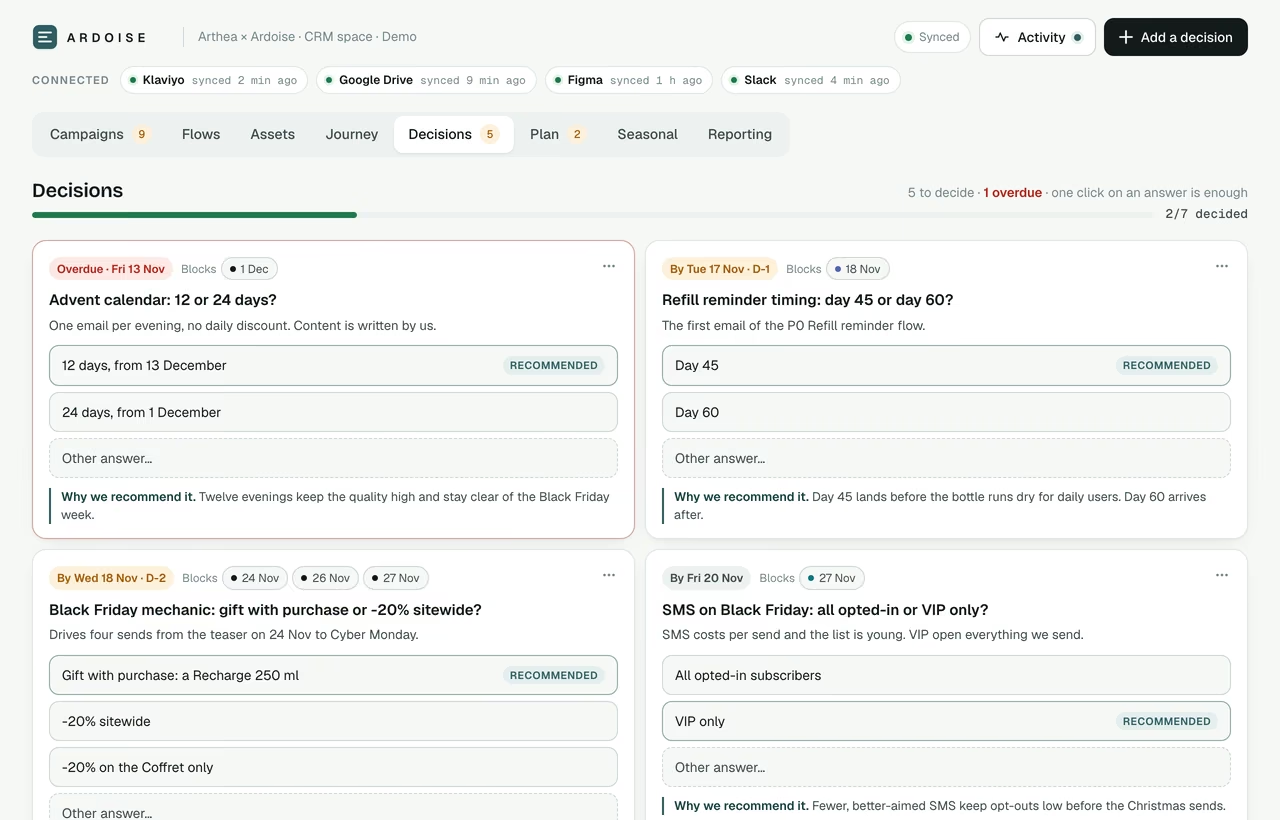
- Header line: "N to decide · M overdue · one click is enough" + progress bar.
- 2-column card grid: question (status dot), context, deadline badge (amber ≤ 3 days, red when late), "Blocks:" chips linking to the sends it unlocks, answer options as full-width buttons with one tagged "Recommended" (with a one-line why), a dashed "Other…" with an inline input. One click records the answer (optimistic, toast with Undo).
- Decided cards collapse into "Decided (N)", answer on a green line, with Reopen.

### Plan
- Objective card (eyebrow "Objective · start to end", H1 = the objective in one sentence, success criteria, progress bar) + tiles: This week, Overdue (red when > 0), Waiting on {{Client}} (amber).
- Phase timeline (Gantt) with a Today line; a vertical list on mobile.
- Filters: owner (All / {{Agency}} / {{Client}}), To do / All, workstream chips.
- Tasks grouped by week. Row: rounded checkbox (instant), title, detail, owner badge, workstream dot, status, due date (red if late). Click opens the drawer.
- Collapsible "Working rules": No Asana, tasks live here and the chat updates them · No designer handoff, modules come from Figma and copy from the chat · Nothing goes live in {{ESP}} without the founder's go.

### Seasonal
- Upcoming / All toggle, type chips: Major promo · Retail moment · Category days · Brand launches · Season · National calendar · Campaign op.
- Grouped by month. Row: date block, name, activation idea for this brand, type chip, priority 1 to 3 stars. Past items dimmed.
- The next 12 to 15 months for the client's country and category, researched on the web, dates verified (write "to confirm" when an official date is not out yet). These moments also appear in the Campaigns grid and feed the composer.

### Reporting
- Latest report title + period + "Open the full report" (the Drive doc).
- 4 KPI cards (CRM share of revenue, flow revenue 7 d, campaign revenue this month, list growth), flow revenue bars, campaign mini-stats, performance scale with the current tier (only if the fee is performance-indexed).
- The Drive folder tree in mono and an "Automation · Active" card listing the scheduled jobs from Part C.
- Renders the latest `reports` entry, falls back to the seeded baseline. Numbers come from {{ESP}} only.

## 4 · Data and capabilities

Load the `artifact-design` and `artifact-capabilities` skills before writing code and follow their API exactly. Declare db (shared live data), user (permissions) and sample (in-page AI writing).

Live collections, real-time:
- sends: id, title, date, end?, time, channel, target, subject, angle, dep, status (review | ok | changes | sent), comment, copy [{label, text}], modules [asset ids], group?, updatedAt
- tasks: id, title, detail, due, stream, owner (agency | client | both), status (todo | doing | blocked | done), notes, updatedAt
- decisions: id, question, context, options[], reco, recoWhy, deadline, blocks [send ids], status (open | decided), answer, decidedAt, updatedAt
- reports: id ("2026-W42" or "2026-10"), title, period, docUrl, kpis [[label, value, sub]], camp [[label, value]], flows [[name, value]], tier, tierNote
- activity: id, at, who, source (chat | client | automation | figma | klaviyo), text

Seeded JSON in <script type="application/json"> blocks: seasonal events, flows, assets, journey, benchmark, reporting baseline, plus a snapshot of sends, tasks and decisions for the first paint. The page renders fully from the seeds when capabilities are unavailable and switches to live data as soon as it arrives. Every write: stable ids, updatedAt, optimistic UI with rollback and a toast on failure. Delete = inline confirm "Delete for the whole team?". A viewer who cannot write gets read-only mode.

## 5 · AI composer (in the page, via sample)

- Step 1: date · channels (multi-select, default time per channel) · target segment · a 3×3 category grid adapted to the brand (hero product A, hero product B, the bundle, campaign op, moment of the day, advice and routine, social proof, reminder, launch) · free-text topic · a dashed box "What the draft will take into account" listing that day's seasonal moments and the other sends within ±4 days. Generate (spinner, Stop) and Write manually.
- Step 2: one tab per channel, editable copy blocks, refine chips (Shorter · More direct · Warmer · New subject line · New angle) + free text, Back. Save creates one send per channel with a shared group id, status To validate.
- The prompt the page sends = a BRAND constant (positioning, products and verified claims only, voice, banned words, emoji rule, signature, legal mentions, channels, the op calendar and what must not be revealed before which date) + the request + the date context + a strict per-channel format (email: subject ≤ 45 chars, A/B subject, preheader ≤ 90, headline, body 60 to 120 words, CTA 2 to 4 words, signature · WhatsApp ≤ 450 chars ending with [link], 2 emojis max, button ≤ 20 chars · SMS ≤ 150 chars, brand prefix, [link], STOP mention) + channel roles (email carries the story, WhatsApp is a short personal follow-up, SMS an ultra-short nudge) + JSON output {title, target, angle, dep, items: [{channel, subject, copy: [{label, text}]}]}.
- Hard rules: one idea and one CTA per send; never invent a number, price, code, review, prize, date or guarantee (write [TO CONFIRM: …] and list it in dep); never reuse the angle or subject of a nearby send.

## 6 · Design system

Fonts (Google Fonts): Bricolage Grotesque 600/700 for display; Geist 400 to 600 for UI; Geist Mono for times, counts, dates and every number (tabular-nums). Base 14px / 1.5.

Tokens on :root. Keep the architecture; set the accent from the client's brand colour (from Figma) and tint the neutrals very slightly toward its hue.

  --bg:#FAF8F7; --surface:#FFFFFF; --sunk:#F3EFEE; --line:#E8E2E0; --line2:#D9D0CD;
  --ink:#1A1517; --ink2:#4A4044; --muted:#8A7E83;
  --accent:{{brand}}; --accent-soft:{{~8% tint}}; --accent-ink:{{darker shade, AA on accent-soft}};
  --ok:#1F7A4D; --ok-soft:#E2F3EA; --warn:#A15C00; --warn-soft:#FDF0DC; --bad:#B42318; --bad-soft:#FDE8E6;
  --c-email:#1A1517; --b-email:#EFEAEC;  --c-whatsapp:#12804A; --b-whatsapp:#E0F3E7;
  --c-sms:#0E7383; --b-sms:#DFF2F4;      --c-flow:#5562B0; --b-flow:#E9EBF8;
  --c-site:#A8650C; --b-site:#FBEFDC;
  --shadow:0 1px 2px rgba(27,20,24,.04), 0 8px 24px -12px rgba(27,20,24,.12);
  --r:14px;

Dark (prefers-color-scheme guarded by :root:not([data-theme="light"]), and again under :root[data-theme="dark"]):
  --bg:#131113; --surface:#1C191B; --sunk:#232022; --line:#2F2A2D; --line2:#423B3F;
  --ink:#F4F0F2; --ink2:#CEC6CA; --muted:#948A8F; accent = a lighter, brighter version of the brand colour;
  --ok:#5BC98F; --ok-soft:#173327; --warn:#F0A94B; --warn-soft:#3A2A14; --bad:#FF7A6E; --bad-soft:#3D1D1A;
  channels: email #F4F0F2/#2B2729 · whatsapp #5BD18F/#16301F · sms #5CC8D6/#122E33 · flow #9AA6F0/#22263F · site #F0B45E/#33260F;
  --shadow:0 1px 2px rgba(0,0,0,.3), 0 8px 24px -12px rgba(0,0,0,.6).

Components: eyebrow 11px 600 .1em uppercase muted · card = surface, 1px line, radius 14, shadow · card H1 22px display 600 -0.015em balanced · KPI number 34px display 700 coloured by meaning · buttons radius 10 (primary ink, accent on hover; Validate green; Request changes amber-soft) · segmented controls on a sunk track · chips 999px with a 9px colour dot · status pill = soft background + status colour + 6px dot · drawer translateX .25s cubic-bezier(.2,.8,.2,1) · toast ink pill 2.2 s (6 s with Undo) · inline SVG icons 20px stroke 1.6 · focus-visible 2px accent outline · reduced motion respected · hit targets ≥ 36px · inputs 16px on mobile · max-width 1280 · ≤ 760px bottom nav, mini calendar, single column, full-screen drawer, zero horizontal scroll at 375px.

Interface copy in the client's language: short, warm, professional, written for a founder who opens it on their phone between two meetings. Human empty states ("Everything is decided.").

## 7 · Build, publish, load, review

1. Write one self-contained HTML file (inline CSS and JS, Google Fonts only), title "{{Client}} Space".
2. Publish it with the Artifact tool, declaring db, user and sample.
3. Load the live data with the artifact database tool in batch writes: the month's sends with full copy, tasks, decisions, the baseline report, the first activity entries.
4. Self-review every tab in light and dark at 375px and 1280px: validate, request changes, decide and undo, tick a task, open a flow, open an asset, check read-only. Fix anything that is not pixel-perfect.
5. Reply with: the link, what's in it, what's still missing from me, and a 3-line message I can send the client.
A+
Partie A+ · Le template
Ou partez de la page finie.
Le template Client Space, c'est la page elle-même : les campagnes que le client valide, le plan, les décisions, les flows, le reporting, le calendrier saisonnier, le rédacteur intégré, les données en direct et les permissions déjà branchés. Collez-le dans le nouveau chat sous ce prompt et Claude l'adapte au client.
client-space-template.htmlUn seul fichier autonome · 1 439 lignes · 140 Ko
Here is the Client Space template (the HTML below). Use it as the base for {{Client}}'s CRM System instead of building from scratch: keep its code, components, data model and design system. Then apply the build prompt for everything specific to {{Client}}:
1. Run the intake and the research (Klaviyo audit, benchmark, market read, journey revamp) and give me the memo first.
2. Replace the CLIENT CONFIG block, the five JSON seed blocks (sends, tasks, decisions, seasonal events, flows), the BRAND brief, the logo and the --accent tokens with {{Client}}'s real data. Nothing from the demo brand may survive.
3. Add what the template does not have yet: the Assets tab (imported from Figma and Drive), the Journey tab (journey map, benchmark, market read), the connection pills (Klaviyo, Drive, Figma, Slack) and the Activity drawer, in the template's own style.
4. Publish it with the Artifact tool declaring db, user and sample, load the live data with batch writes, review every tab in light and dark at 375px and 1280px, and reply with the link and the 3-line message for the client.
B
Partie B · Piloter
À coller dans les instructions du projet client.
Renseignez le nom du client et le lien de la page. Ensuite, une phrase de retour dans le chat met à jour chaque envoi, tâche et décision concernés, et vous recevez un compte rendu en trois lignes.
Protocole de pilotage472 mots
You are the CRM operator for {{Client}}. The single source of truth is the client's CRM System artifact: {{artifact link}}. This chat is its control room: any feedback I give here runs the whole chain, end to end, without me touching the page, a task tool or a design file.

On every message about this client:

1. Read first. Pull the current sends, tasks, decisions, activity and the latest report from the artifact database. Note what the client changed since last time: validations, change requests and their comments, answered decisions, ticked tasks.

2. Think, then push back. If my feedback conflicts with the data, a past decision, the calendar (sends within ±4 days, seasonal moments, the op calendar), the journey map or the brand rules, say so in one line with your recommendation before executing. Base every recommendation on {{ESP}} numbers when they exist and state the assumption when they don't. One sentence of why for every call you make.

3. Execute the chain. Apply the change to every object it touches:
   - copy rewritten: send back to To validate, comment cleared, a short note of what changed;
   - client requested changes: rewrite per their comment, back to To validate;
   - decision answered: update the sends it blocks and the related tasks, create the follow-up tasks;
   - send moved or added: check collisions and the op calendar, update the dependent tasks;
   - design feedback ("bigger hero", "new product shot"): re-import the module from Figma when it changed there, otherwise list exactly what the Figma file needs and update the send's modules;
   - new durable rule (voice, banned word, offer, legal mention): update the BRAND brief in the page and republish;
   - new flow, popup, journey or seasonal change: update the seeded JSON and republish.
   Log every change in `activity` (source chat). Write data with batch writes. Republish only when structure, seeds or the brand brief change. Never ask me to edit the page by hand.

4. Klaviyo. When a send is Validated and I say go, create it in {{ESP}} as a DRAFT (campaign or flow email) with the validated copy and the Figma modules, then give me the link to review. Nothing is scheduled or sent without my explicit go.

5. Report back in 3 to 5 lines: what changed (with counts), what is waiting on the client, what I need to decide. When the client needs to act, give me a ready-to-paste message (Slack, email or WhatsApp). Never send it yourself unless I ask.

Standing rules:
- Never invent numbers, prices, codes, reviews, prizes, dates or guarantees. Use [TO CONFIRM: …].
- {{ESP}} is the source of truth for performance; the page mirrors it.
- Client-facing text is final quality, in the client's language, on brand.
- Benchmarks state what was observed and where; a guess is labelled as one.
C
Partie C · Automatiser
Six tâches qui tournent sans vous.
Envoyez-le une fois dans le chat du client. Claude crée les tâches programmées et confirme chacune avec sa prochaine exécution.
Automatisations208 mots
Set up these scheduled tasks for {{Client}}, each running with the Part B protocol and the artifact link. Confirm them to me with their next run time.

- Every weekday 8:30 · Morning read: what the client did in the space since yesterday (validations, change requests, decisions, ticked tasks), rewrites for every change request, and a 3-line summary for me.
- Every Monday 8:45 · Weekly report: last 7 days from {{ESP}}, write the week's entry in `reports`, create the full report in {{Drive folder}} / 01 · Reporting / YYYY / MM, add the tasks and decisions it reveals.
- The 2nd of each month · Monthly report: vs objectives and vs last month, 3-month trend, learnings, next month's plan.
- The 20th of each month · Next month's calendar: sends drafted as To validate with copy, from the seasonal calendar, the journey gaps and open decisions, plus the message asking the client to validate.
- Every Friday · Figma sync: compare the brand kit and module components with the Assets tab, re-import what changed, flag sends that use an updated module.
- First Monday of each quarter · Market refresh: re-run the benchmark on the same brands, update the Journey tab and tell me what moved.
D
Partie D · Lancer
Les 72 premières heures.
Du premier prompt à un client qui valide ses envois depuis son téléphone.
Heure 0Connecter et brieferConnectez les outils (partie 0), collez la partie A, répondez au questionnaire en un seul message.
Jour 1Lire avant d'écrireL'audit Klaviyo, le benchmark et la refonte du parcours arrivent sous forme de note. Vous corrigez dans le chat.
Jour 2La page est en ligneLes campagnes du mois suivant avec leurs textes, les flows de la phase 1, les assets Figma, les décisions et le plan. Relisez tout sur votre téléphone.
Jour 3Passer la mainCollez la partie B dans le projet, mettez en place la partie C, partagez le lien au client avec ce message.
Message au client
Voici votre espace CRM. Tout ce que nous faisons ensemble y vit : les envois à valider, les flows, les décisions que nous attendons de vous et les chiffres de la semaine. Touchez un envoi pour le valider ou demander une modification, un clic suffit pour trancher une décision. Il se met à jour chaque fois que nous travaillons dessus.
Clé en main
Vous préférez qu'on le pilote ?
Le kit, c'est le système. Le faire tourner chaque semaine, c'est le travail. Nous le mettons en place sur votre marque et le pilotons avec vous, dans le cadre de notre expertise rétention.
Votre compte Klaviyo audité, les flows reconstruits là où ils fuient
Votre espace client construit et alimenté, à vos couleurs
Les campagnes rédigées, validées dans la page, montées en brouillon dans Klaviyo
Le parcours et le calendrier saisonnier planifiés des mois à l'avance
Un reporting hebdomadaire tiré de vos chiffres Klaviyo
Questions fréquentes
Vos questions avant de coller
Le kit est-il vraiment gratuit ?
Oui. Copiez-le, téléchargez-le et utilisez-le avec vos propres clients. Aucune inscription : laissez votre e-mail seulement si vous voulez recevoir le kit et la v3 à sa sortie.
De quoi ai-je besoin ?
Claude (Cowork ou l'application desktop) avec Klaviyo, Google Drive et Figma connectés, plus Slack si vous le souhaitez. La partie A construit l'espace client et le publie depuis Claude, sous forme de page que vous partagez avec votre client.
Le kit fonctionne-t-il sans Klaviyo ?
Oui. La partie 0 connecte Klaviyo ou votre propre ESP, et le protocole de pilotage parle de votre ESP partout où la plateforme compte. Indiquez le vôtre dans le questionnaire et Claude travaille à partir de ses chiffres.
Claude envoie-t-il des e-mails tout seul ?
Non. Claude lit librement et n'écrit que des brouillons. Rien n'est programmé, envoyé ou publié sans votre feu vert explicite, et chaque modification apparaît dans l'historique de l'espace client.
Que contient le template ?
Une page HTML finie et autonome : Campagnes, Plan, Décisions, Flows, Reporting et Saisonnalité, le rédacteur intégré, les données en direct et les permissions déjà branchés. Le prompt express l'adapte à votre client et ajoute les onglets Assets et Parcours.
Pouvez-vous le mettre en place pour nous ?
Oui. En 30 minutes d'appel, nous regardons votre compte Klaviyo et l'organisation de votre équipe, puis nous vous disons s'il vaut mieux que nous mettions le système en place, que nous le pilotions avec vous, ou que vous gardiez simplement le kit. Si nous ne sommes pas les bonnes personnes, nous vous le disons.
Le kit est à vous dans tous les cas. Si vous préférez que le système soit mis en place et piloté sur votre marque, réservez 30 minutes avec le fondateur. Si nous ne sommes pas les bonnes personnes, nous vous le dirons.
Nous utilisons des cookies essentiels au fonctionnement du site, et des cookies optionnels de mesure d'audience, de personnalisation et de marketing uniquement avec votre consentement. Vous pouvez modifier vos préférences à tout moment dans notre
politique de confidentialité.
Strictement nécessaires
Indispensables à la sécurité, à la mémorisation du consentement et au fonctionnement du site.
Mesure d'audience
Mesurent le trafic et l'usage du site pour améliorer la performance et l'expérience.
Personnalisation
Mémorisent vos préférences et améliorent l'expérience de navigation d'une visite à l'autre.
Marketing
Permettent l'attribution publicitaire, le retargeting et la mesure de performance des campagnes.